For the past several weeks, the entire country has been transfixed with the Nancy Guthrie case. She was taken from her Tucson home and has been missing for nearly three weeks. There have been numerous videos of the home, including doorbell camera footage showing the kidnapper approaching the home, helicopter shots of police entering the home, flowers laid by her mailbox, and more.
When you Google “Nancy Guthrie home,” the next suggestion by Google is “Nancy Guthrie home value.” That search can quickly lead you to websites that share her home address and phone number. A search on that address would have pulled up photos of the house—inside and out—on several real estate websites (until those photos were recently removed).
A kidnapper could easily get a sense of where all the entrances are. Windows. Sight lines. Even the “feel” of the house. And it wouldn’t require breaking in. It’s the digital equivalent of leaving your front door unlocked and a printed map of your home for anyone who wants it.
An Open House, Every Day, for Everyone

When you’re buying or selling a home, real estate websites are great, but they’re also a gold mine for potential criminals. If your home has ever been listed for sale within the last decade, there’s a pretty good chance these websites include:
- Interior photos that show room flow, door placement, and blind spots
- Exterior angles that reveal gates, fences, lighting, and camera placement
- Clues about where valuables might be (primary bedroom, home office, basement storage)
- Sometimes it even includes floor plans, 3D tours, and “walkthrough” videos
It’s Not Paranoia, It’s Really Happening

Police have reported they have found criminals using Google Maps to case homes prior to burglaries. Riverside, California, police detectives have arrested suspects who had mapping apps on their devices and real estate websites in their internet search history, where it was clear they were researching which homes to target, how to enter the neighborhood, and even where to park.
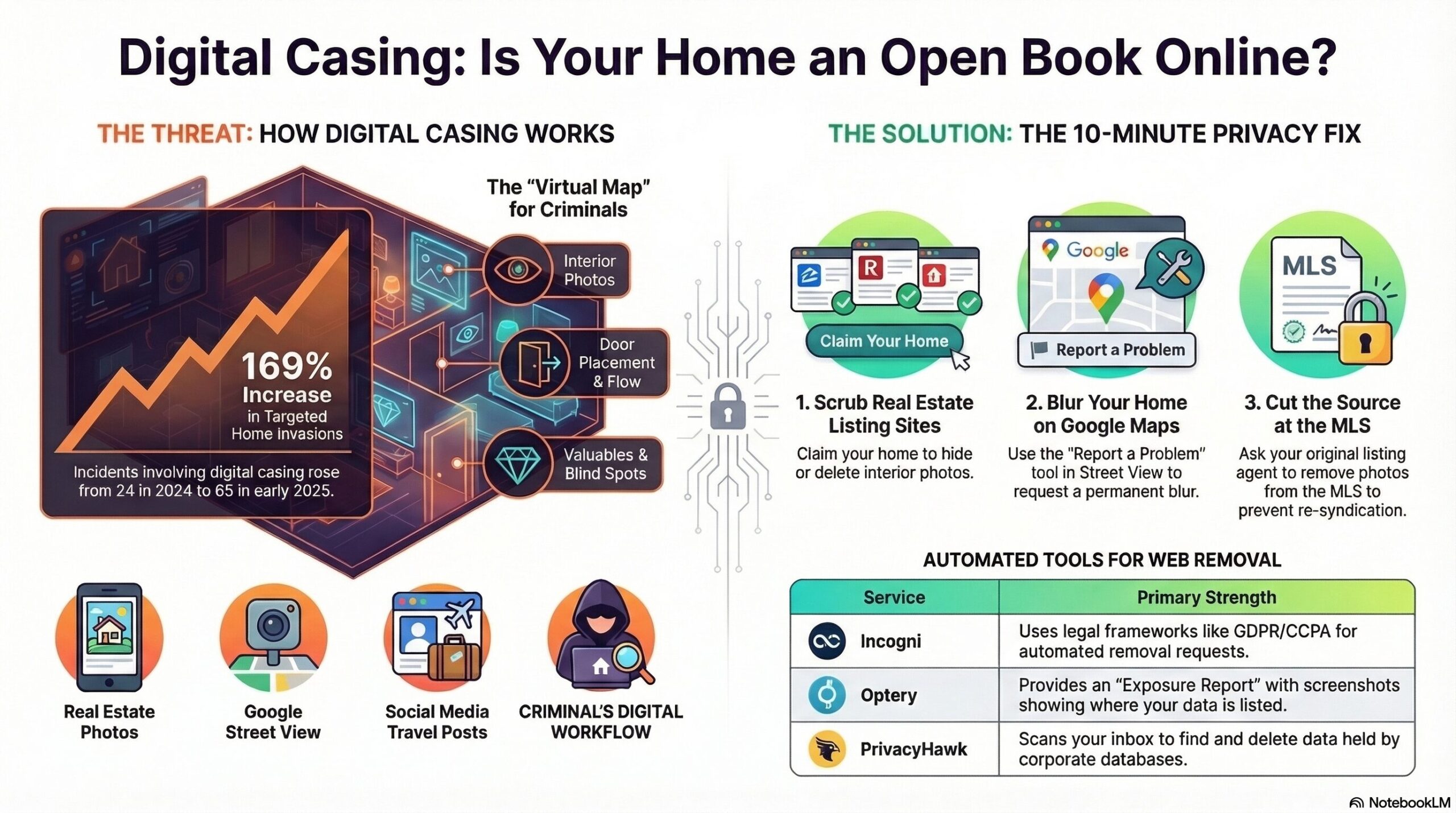
While security experts have warned about this for years, there has been an increasing number of incidents where criminals have used these sites to case out potential targets – particularly violent home invations tied to cryptocurrency. A recent report cites 65 such incidents in 2025, up roughly 169% within six months and nearly triple the 24 incidents recorded in 2024.
At the same time police were searching for Nancy Guthrie, just two hours away in Scottsdale, Arizona, two teens allegedly posed as delivery drivers and forced their way into a couple’s home, duct-taping and assaulting them while searching the home for $66 million in cryptocurrency. It’s not just big-time crypto investors that have to worry, as Bloomberg recently shared how even small time crypto investors are facing violent attacks.
It’s important not to get distracted by the fact that these incidents involved cryptocurrency. Criminals can use the same research tactics to prepare for burglaries of anything valuable.
How “Digital Casing” Works

Here’s a simplified version of what criminals do once they have identified a potential victim:
- Find your address and phone number: People-search sites and data brokers pull from public records, marketing databases, old sign-ups, and data resellers. It’s often one search away.
- Pull up your home address up on Zillow/Redfin/Realtor: Listing photos show room layouts, entries, window types, locks, and sometimes cameras.
- Check mapping tools: Google Maps gives an overhead view of the entire property (even a 360 degree fly around), and Street View gives sight lines from the street, which side is darker, where fences/gates are, and how close the neighbors are.
- Cross-check social media: They’ll search social media for oversharing. They’ll look for posts about vacations or travel, new purchases, or home remodeling projects that give them an updated view of the home.
The 10-Minute Fix to Hide Your Home

If you’re not actively selling your home, there is no good reason for the internet to host a virtual tour of the inside of your home. These steps can vary a bit by device/app/browser, but here’s what you can do:
Zillow: Hide or Remove Your Home Photos
Zillow’s official guidance: you need to claim ownership, then go to “Edit facts” to hide/remove photos. Here’s the quick path: Sign in → profile icon → Your Home → search your address → claim it → Edit Facts → hide/delete photos → save.
Redfin: Hide Listing Photos
Redfin also routes this through the Owner Dashboard and photo controls (hide listing photos). Sign in and go to your Owner Dashboard, select your property, click Edit Photos, and select Hide listing photos.
Realtor.com: Remove Photos
Realtor.com uses a “My Home” claiming workflow, then a remove-photos option once you’ve verified ownership. Go to realtor.com/myhome. Claim your home, then select it under My Home > Remove Photos > Yes, Remove All Photos.
Google Street View: Blur Your House
This is the move most people don’t know exists. On a computer, go to Google Maps → search your address → drop into Street View → click “Report a problem” (bottom right) → position the red box over your home → request blurring for “My home” → submit. NOTE: blurring is effectively permanent. Double-check the view before you submit.
Pro Tip: Pull Photos from the MLS (The Source Feed)
Here’s the annoying truth: Zillow/Redfin/Realtor.com and other real estate websites often ingest photos from the MLS and other listing feeds. That means you can delete photos in one place…and they can pop back up later from the source. If you can, contact your old listing agent and ask them to remove interior photos (or restrict distribution) from the MLS. Once it’s gone at the source, feeder sites tend to follow over time.
Removing Real Estate Photos Doesn’t Fix the Privacy Problem

Even if your home photos vanish, the bigger issue remains: your address and phone number are still pretty easy to find using a simple Google search on your name. You don’t have to become a privacy monk. But you do need to make yourself harder to target than the next person. There are some free ways you can opt out of people-search and data broker sites.
Reduce the “Broadcast” From Your Life
- Don’t post vacation updates in real time (post after you’re home)
- Avoid showing the front of your house, street signs, or mailbox numbers
- Be careful with “home tour” content (even innocent renovation posts reveal layouts)
- Don’t post screenshots that imply wealth (crypto balances, expensive purchases, safes)
You’re not hiding. You’re not volunteering intelligence.
Consider Data-Removal Services
If you’d rather outsource the opt-out grind, these services can reduce exposure, especially on the big broker ecosystems. Just keep your expectations realistic. This is essentially a game of whack-a-mole, because as soon as your data is removed from one site, you’ll find it pops up on another. Here are some common options:
Incogni (The Automator): Incogni, owned by Surfshark, is built for efficiency. It uses legal frameworks (like GDPR and CCPA) to send waves of automated requests. It is particularly strong at tackling “private” marketing brokers that don’t have public-facing search pages. Its suppression list feature is a standout, actively telling brokers not to re-add you once you’ve been removed.
Optery (The Evidence-Seeker): Optery is widely considered the most transparent. Even their free tier is useful because it provides an “Exposure Report” showing you exactly where you are listed. At higher tiers, they use a “Humans + Machines” approach. The inclusion of before-and-after screenshots is their “killer feature,” giving you visual proof that a listing is truly gone.
PrivacyHawk (The Corporate Footprint Specialist): PrivacyHawk goes beyond standard data brokers by targeting the corporate databases of thousands of companies you’ve interacted with (retailers, apps, etc.). By scanning your inbox (with permission), it identifies which companies have your data and sends automated “Delete” or “Do Not Sell” requests to reduce your risk in future data breaches. It also features a “Privacy Score” (300-850) that tracks your progress, similar to a credit score.
DeleteMe (The Human Touch): As one of the oldest players, DeleteMe relies heavily on human privacy experts. While AI handles the bulk, people actually call or email brokers to ensure tricky removals are completed. It covers a vast number of sites (750+) and is excellent if you have a complex digital footprint that requires more than just an automated script.
These services typically offer to automate the tedious opt-out process across dozens, sometimes hundreds, of data broker websites. Still, outsourcing your privacy cleanup to a third party doesn’t guarantee complete removal. For individuals concerned about privacy but wary of ongoing costs, there’s a strong case for taking matters into your own hands.
Send this to Someone You Care About

If someone bought a home in the last few years, odds are their listing photos are still online, showing strangers the floor plan, bedrooms, and entry points. Send them this article. because criminals don’t need to “case the neighborhood” the old way. They can case you from a couch, with free tools, in minutes, building a little dossier that includes your address, your home’s layout, and the best way in and out.
| Listen to this as a Podcast |