
| Listen to this article as a podcast |
Christy had 14,000 photos on her phone. Photos of her kids growing up. Her late father’s last birthday. An incredible chance meeting with a celebrity. Fourteen thousand moments she had lived, loved, and captured, all stored in a single device that fit in the palm of her hand.
Then, as she attempted to take a selfie on her first-ever gondola ride in Venice… she accidentally dropped her phone into the Grand Canal.
No cloud sync, backup, or warning. Just a split second and a splash, and 14,000 memories were gone. Unfortunately, this isn’t a rare tragedy. It happens every single day to people who consider themselves careful, people who meant to set up a backup, or people who never worried because nothing had ever gone wrong before. If you are reading this right now, and your entire photo library is only saved on your phone, you are one bad moment away from the same story.
Don’t Gamble with your Phone, it’s Not a Safe.
Here’s what no one tells you when you buy a smartphone: the device you are trusting with your most precious memories was designed to be replaced every two years. It was built to be portable. That means it goes everywhere, including places where things break, get stolen, fall, and get soaked.
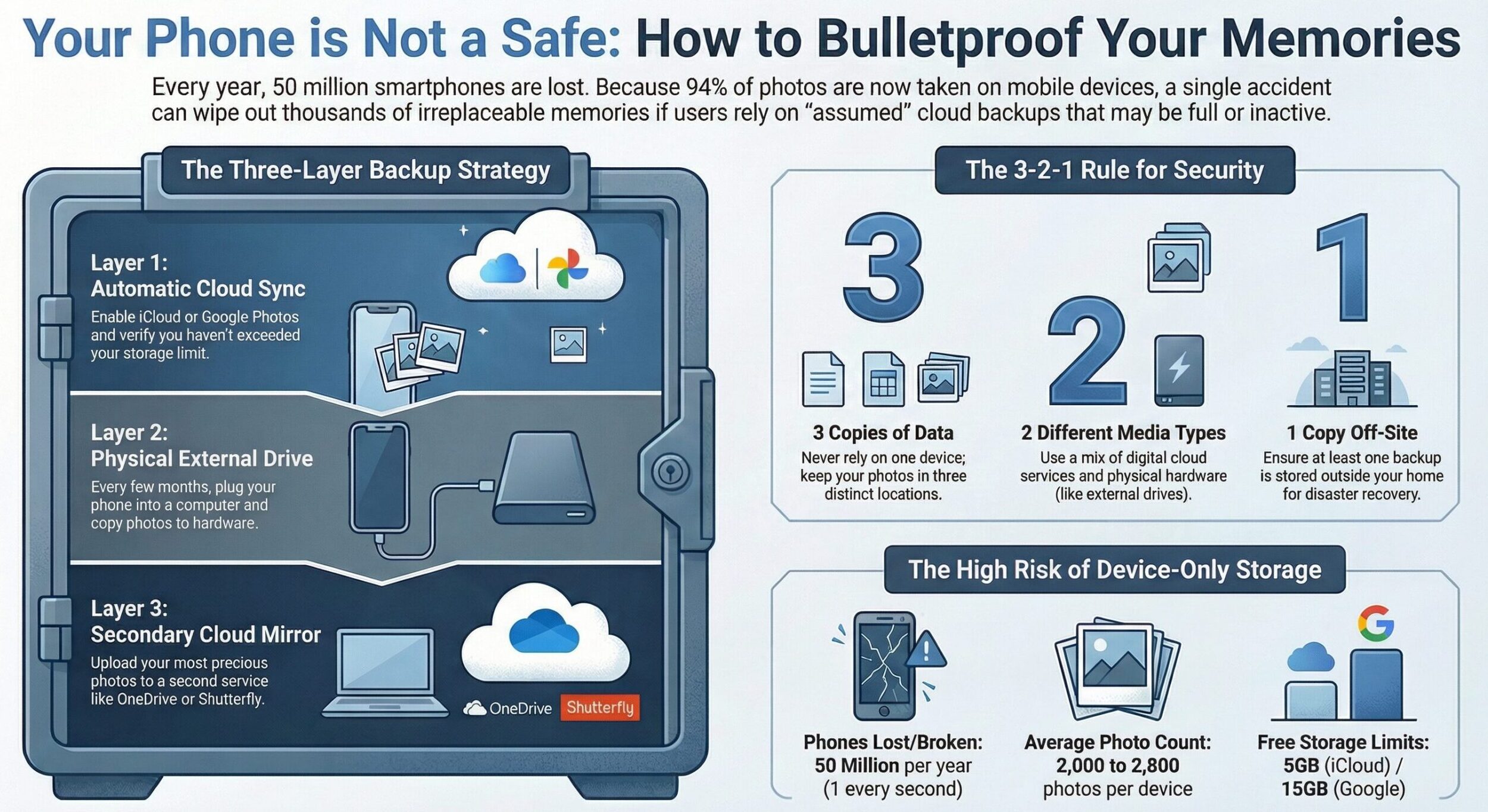
The truth is that every year, Americans lose or break over 50 million smartphones. That’s nearly one every second. Each one of those phones is a potential catastrophe for the person who owned it, because the average smartphone user now carries between 2,000 and 2,800 photos on their device, years of irreplaceable moments packed into something smaller than a paperback book. And 94% of all photos taken today are shot on smartphones. Not cameras with SD cards you can pop out and save. Not dedicated devices with built-in backup software. Smartphones. The same devices that go through washing machines, get snatched from pockets, purses, and tables, and get shattered on concrete sidewalks.
People who’ve lost all of their photos often say that it’s never the big moments they mourn the most. Not the wedding or graduation shots. Not the carefully staged holiday portraits. It’s the Tuesday afternoon they forgot they photographed. The random selfie with their dad at a gas station on a road trip. The blurry video of their kid laughing so hard they couldn’t breathe. The accidental photo of the kitchen table that somehow captured exactly who they were in that season of life. Those are the ones that are gone forever, and no amount of money, grief, or clever data recovery software brings them back. When a phone disappears without a backup, those moments simply cease to exist, except in the fading memories of the people who were there.
That is what is actually at stake here. Not gigabytes. Not storage space. The irreplaceable record of your actual life.
The Dangerous Assumption That Catches People Off Guard: “I have iCloud”

Before you tell yourself you’re covered, when did you last check that your cloud backup is actually running? Not assumed, but actually opened the settings and confirmed. Here is what happens to thousands of people every month: iCloud or Google Photos runs out of storage space. Photos stop syncing. The notification gets dismissed. Life goes on. Months pass. Maybe a year. Then the phone is gone and the person discovers that their “backup” stopped working long before the phone disappeared.
Both iCloud and Google Photos offer limited free storage, 5 GB and 15 GB, respectively. A single year of active photo-taking can blow right past those limits without you ever noticing. Once the limit is hit, your automatic backup tops. Sure, you’ll get annoying emails or pop-ups telling you your storage is full—all while your photos pile up unprotected.
Even when cloud sync is running perfectly, accidental deletion can undo everything. Tap the wrong button, let a curious child play with your phone, or hit “clear storage” without thinking, and photos can vanish from your device. Then it syncs that deletion to the cloud, removing the photos from both places simultaneously. Most services keep deleted items in a recoverable state for 30 to 60 days, but if you miss that window, they’re gone.
The Three-Layer Backup System

People with the right layers of backup protection never lose their photos. They don’t rely on a single system. They build redundancy so that no single failure can wipe everything out at once. Here’s how to do it:
Layer 1: Turn on automatic cloud backup and verify it’s working.
This is your daily safety net. It should be running constantly, in the background, without you having to think about it.
- On iPhone: Go to Settings > [Your Name] > iCloud > Photos. Make sure “Sync this iPhone” is toggled on. Then check your iCloud storage. If it’s nearly full, pay the $0.99/month for 50 GB. That’s less than a coffee once a month to protect years of memories.
- On Android: Open Google Photos, tap your profile icon, select “Photos settings,” then “Backup,” and confirm it’s enabled. Google One plans start at $1.99/month for 100 GB.
Do this right now. Not when you finish reading. Now. It takes 45 seconds.
Bonus tip: Even on an iPhone, you can download the Google Photos app, so you can have your photos sync to BOTH iCloud and Google Photos for extra backup protection.
Layer 2: Back up your photos to a physical external drive every few months.
Cloud services are convenient, but they depend on your subscription staying active and your account not being compromised. A physical drive that you control is insurance against all of that. Once every couple months, plug your phone into your computer and copy your entire camera roll to an external hard drive. These cost less than $100 and can store 50,000 photos or more. Label the drive clearly and store it somewhere safe. This takes 15 minutes and could save everything.
Layer 3: Mirror your most important photos to a second cloud service.
For photos that matter most, the ones you would be emotionally devastated to lose, add another cloud backup as a redundant layer. If you have a Microsoft 365 subscription, save them to your Microsoft OneDrive account. You can also upload the photos to photo printing sites like Shutterfly, Snapfish, MPIX, or even Walmart photos. Pick one and use it. If your primary cloud account is ever compromised or suspended, this backup hopefully remains untouched.
The 3-2-1 Rule: Simple, Powerful, Non-Negotiable
Security professionals use a framework called the 3-2-1 rule:
- Keep three copies of your data, stored on two different types of media, with at least one copy off-site.
In plain language, keep photos on your phone, a cloud service, and a physical drive kept somewhere other than your home. That’s it. Three things. If you have all three in place, you are virtually bulletproof against photo loss. Unfortunately, most people don’t meet even one of these, and almost nobody has all three.
Don’t organize, just protect your photos now.

If the thought of sorting through thousands of photos feels paralyzing, ignore it. Organization is not the primary goal, protection is. Open your cloud backup settings and confirm it’s running. Plug in an external drive and copy your camera roll. Then set a recurring calendar reminder: “Back up phone photos” once every couple months. That’s the whole system. It takes 20 minutes to set up and maybe an hour per year to maintain. The alternative is losing everything because you never got around to it, and that’s not a reasonable trade. Somewhere on your phone right now is a photo you would be devastated to lose. You took it without thinking. You haven’t looked at it in months. But the day something happens to your phone, that photo is the first thing you’ll think of.
You still have it. Back it up before you don’t.
This is a message for World Backup Day, observed every March 31. Get the ultimate guide to backing up your digital life.