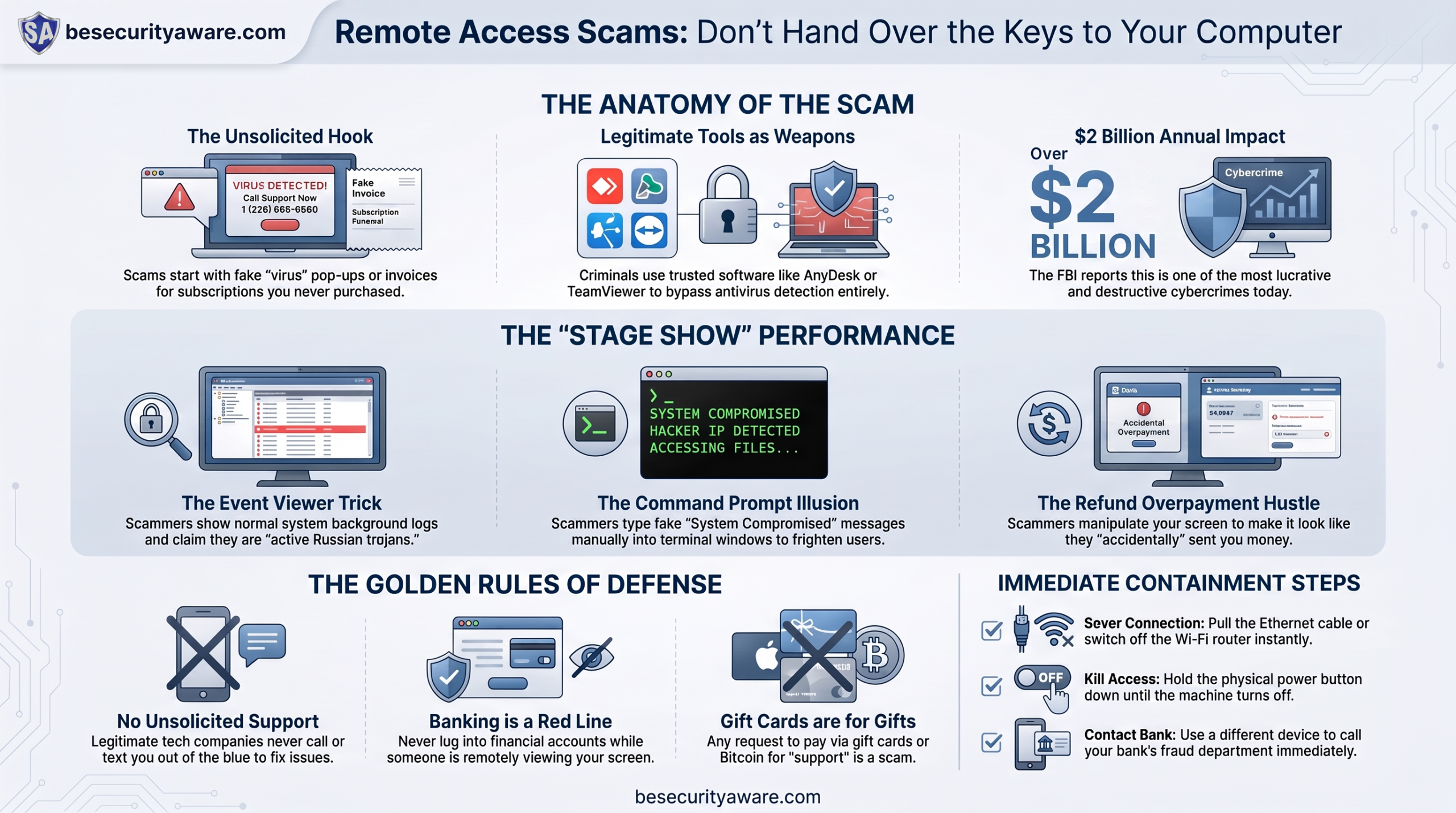
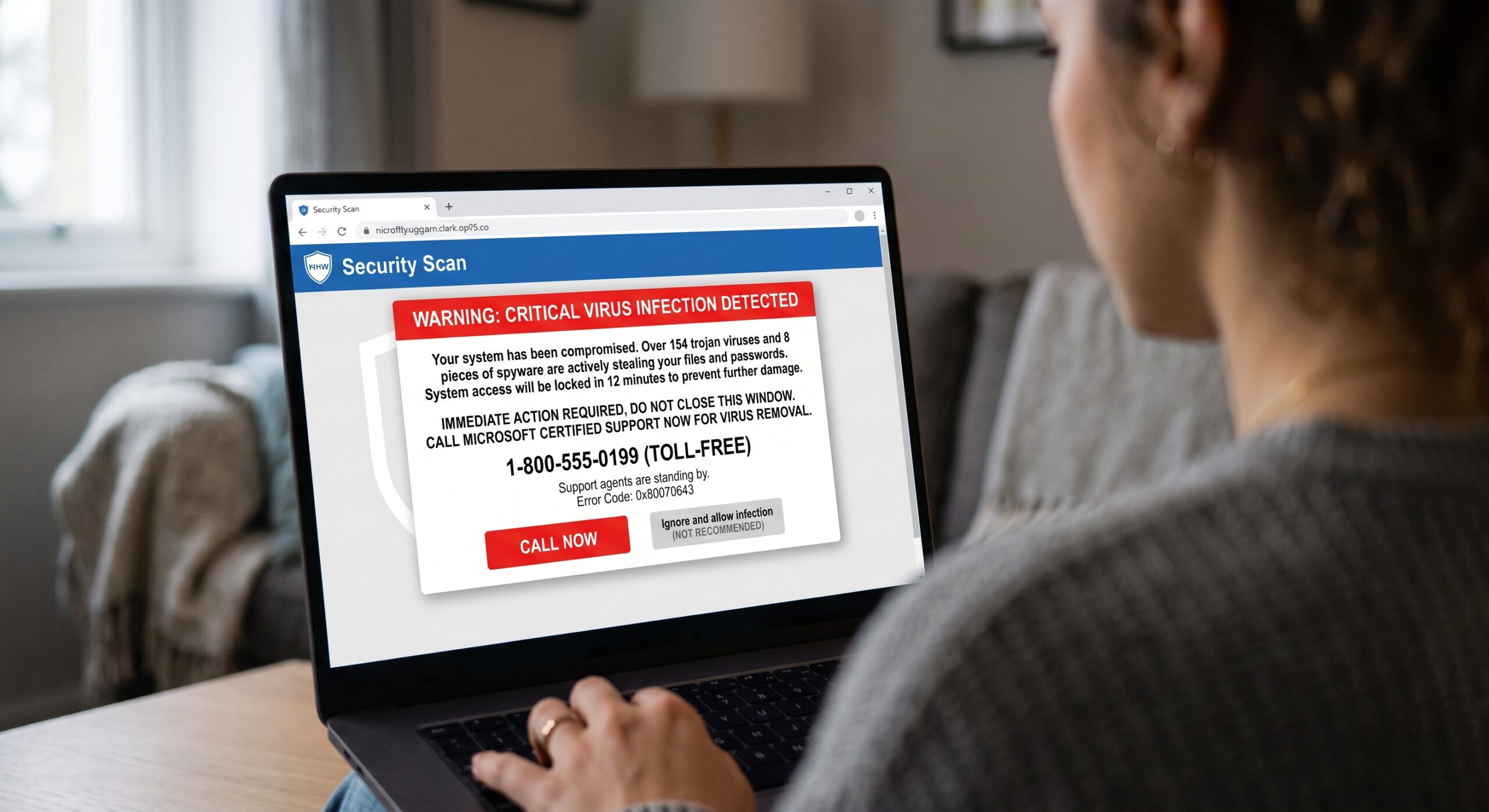
You suddenly get a pop up on your screen that tells you you have a virus and need to call support immediately. There’s a toll-free number on the screen for you to call for help. It could also show up as an official-looking email invoice thanking you for auto-renewing a $499 annual Geek Squad, McAfee, or Norton subscription you never bought, complete with a customer service number to dispute the charge.
You dial the number. The representative answers, speaks with calm authority, and offers an employee badge number. They apologize for the inconvenience and offer to help you. However, in order to cancel the charge or clear the infection from your system, they need you to download a quick, secure connection tool so they can see exactly what’s happening on your computer.
That’s the trigger for one of the most destructive and lucrative cybercrimes today. The FBI’s Internet Crime Complaint Center (IC3) reports that tech support and remote access fraud drain more than $2 billion out of American bank accounts every single year.
Once you grant a stranger access to your machine, they aren’t troubleshooting an issue, they’re staging a performance.
Understanding how these scams operate strips away their power. Here’s how criminals manipulate legitimate tools, route calls through hidden pipelines, manufacture fake emergencies, and drain bank accounts—and why you should never, under any circumstances, hand over remote control of your computer to someone you don’t know.
| Subscribe to our podcasts on Spotify and Subscribe to our YouTube Channel |
The Dark Infrastructure: When Even “Legitimate” Calls Are Rerouted

Many people believe they could never fall for this kind of trap because they would never dial a sketchy number. But what if the call routing infrastructure itself has been hijacked behind the scenes?
A major federal case prosecuted by the U.S. Department of Justice revealed just how sophisticated and deeply embedded this criminal industry has become. In that case, two American corporate executives, including the former CEO and former Chief Strategy Officer of a major call tracking and telecommunications company, pleaded guilty in federal court for their roles in fueling a massive, global tech-support fraud pipeline. Their business provided the essential telecommunications plumbing: generating phone numbers, routing calls, and forwarding incoming inquiries from unsuspecting victims directly into overseas fraud call centers in India and Tunisia.
Even after receiving numerous law enforcement inquiries and customer complaints detailing how Americans were being defrauded, these executives didn’t shut down the pipelines. Instead, they actively advised the scam operations on how to evade detection, reduce consumer complaints, and keep the illicit call routing alive.
This case highlights a critical lesson. Even if a phone number appears in a convincing search result, looks like a local or domestic toll-free line, or seems completely legitimate, you cannot trust who is on the other end of the line. Criminal networks purchase legitimate infrastructure, buy sponsored search ads, and deploy aggressive browser pop-ups specifically designed to funnel your call straight into a predatory boiler room.
Why Scammers Love Remote Access Software

To pull off a remote access scam, criminals rarely use obscure custom malware. Instead, they rely on commercial remote-desktop software. These are the exact tools used every day by legitimate corporate IT departments and authorized software vendors. They will direct you to real websites or walk you through launching tools like:
-
AnyDesk
-
TeamViewer
-
Microsoft Quick Assist
-
LogMeIn / GoToAssist
-
Zoho Assist or UltraViewer
Because these are authorized applications digitally signed by major corporations, your antivirus won’t flag them. Your operating system trusts them completely. When you download one of these tools and read the 9-digit session code aloud over the phone, you aren’t just sharing your screen. You are handing the caller physical control over your mouse, keyboard, internal file directories, and network connection. You have effectively unlocked your front door, handed a stranger your keys, and sat down on the couch to watch.
The Stage Show: How Scammers Manufacture a Crisis

Once inside your machine, scammers know that most everyday users don’t spend their free time exploring Windows administrative consoles or reading kernel error logs. They exploit that technical gap to turn ordinary system background processes into terrifying “proof” of an attack. Here are the three most common magic tricks they perform on your screen:
1. The “Event Viewer” Trick
The technician opens the built-in Windows Event Viewer and scrolls through a long list of yellow warning triangles and red error icons. “Do you see this?” they ask in a grave tone. “Every single red mark is an active Russian trojan or an overseas hacker intercepting your personal data.”
-
The Reality: Every operating system logs minor background errors, dropped packets, and application timeouts during normal, healthy operations. A brand-new computer fresh out of the box will show dozens of red error logs within its first hour. It is completely harmless, but to someone who doesn’t work in IT, a wall of red exclamation marks looks like a system-wide meltdown.
2. The Command Prompt “Tree” Illusion
The scammer opens a black terminal window (Command Prompt) and types tree or netstat. The screen immediately floods with lines of text listing directory trees or network ports scrolling at breakneck speed. Once the scrolling stops, the scammer manually types a sentence at the prompt: “Foreign IP addresses connected: 18. System compromised.”
-
The Reality: The
treecommand is simply a built-in utility that displays a graphical list of your normal folders and files. It has nothing to do with viruses. The frightening warning at the bottom wasn’t generated by an diagnostic tool; the scammer typed it out with their own keyboard while you were distracted by the scrolling text.
3. Blacking Out the Screen
While assuring you that they are running an “advanced system scan,” the scammer uses a feature built into tools like AnyDesk to darken your monitor or put up a banner that reads “Maintenance in Progress.”
-
The Reality: While you patiently stare at a black screen, the scammer is rapidly digging through your Documents folder, searching for tax returns, scanning your browser’s saved passwords, or attempting to plant persistent backdoors to retain access after you hang up.
The Trap: How They Steal Your Money

Once they have convinced you that your machine is in critical danger, or that an erroneous transaction took place, the trap snaps shut. These schemes typically branch into three distinct extortion paths:
1. The Fake Antivirus / Maintenance Contract
The caller claims they can purge the viruses and install enterprise-grade security for an exorbitant price, often demanding $300 to $1,500 for a “five-year firewall license.” Once you hand over your credit card details, they might run a free utility (like CCleaner) or do nothing at all, while charging your card for a worthless service. Do not purchase antivirus software from someone over the phone. Use a reputable antivirus software from our recommendations.
2. The “Refund Overpayment” Hustle
This is the most destructive technique in their playbook. The caller claims they are refunding money you were wrongfully charged. They direct you to log into your online bank account while they maintain remote control.
-
Once you log in, they blank your screen for a few seconds.
-
During the blackout, they move $5,000 from your Savings account into your Checking account using your bank’s normal transfer feature. Alternatively, they open your browser’s Inspect Element developer tool and simply change the text displayed on the webpage to make your balance look $5,000 higher than it really is.
-
They turn your screen back on and feign absolute panic: “Oh no! I typed an extra zero! My accounting department accidentally deposited $5,000 into your account instead of $50! I am going to lose my job, my company will sue me, and federal authorities will freeze your assets unless you return that money today!”*
In a storm of manufactured guilt and sheer panic, victims are instructed not to talk to bank tellers (“they won’t understand our proprietary transaction”) and instead rush out to buy thousands of dollars in Apple, Google Play, or Target gift cards, initiate an irreversible wire transfer, or deposit physical cash into a Bitcoin ATM to “return” funds that never existed in the first place.
If you want to learn more about how this scam works, and how a few YouTubers got some revenge on these scam call centers, watch this video:
3. Outright Account Takeover and Hostage Lockouts
If the scammer spots cryptocurrency wallets, financial records, or open browser tabs for investment accounts, they drop the performance entirely. They use administrative tools to lock you out of your machine with a custom password (sometimes abusing Windows Startup tools or remote lockout features), essentially holding your files hostage while they systematically siphon your liquid assets and open lines of credit in your name.
“Yeah, But I’d Never Fall for That”
It’s tempting to read these breakdowns and assume that only reckless, gullible, or technologically illiterate people fall victim to remote access fraud. That assumption is dangerous, and it’s precisely why these operations steal billions each year.
The criminals running these boiler rooms are not relying on your lack of intelligence. They rely on engineered cognitive overload. When a screen locks with flashing red warnings, or when a confident caller threatens that you are committing “interstate wire fraud” by keeping an accidental refund or tells you that hackers are actively in your computer, your brain is flooded with cortisol and adrenaline.
In fight-or-flight mode, logical reasoning and critical evaluation shut down. You stop questioning whether Microsoft actually operates an inbound support hotline or whether it makes sense to repay a software vendor using gift cards. Your focus narrows entirely to one goal: make the crisis stop.
What to Do If You’re Targeted

If You See a Browser Warning Right Now
-
Do not call the phone number: Legitimate operating systems (Microsoft Windows, Apple macOS) will never display a toll-free customer service phone number on an error message or freeze your machine and ask you to dial it.
-
Kill the browser:
-
On Windows: Press
Ctrl + Shift + Escto open Task Manager, select your web browser (Chrome, Edge, Firefox), and click End task. -
On Mac: Press
Command + Option + Esc, highlight your browser, and select Force Quit. -
When you reopen your browser, click “Don’t Restore” if it asks to reopen your previous tabs.
-
If You Already Let a Scammer Connect
If you allowed a stranger into your machine, take these containment steps immediately:
-
Sever the internet connection instantly: Pull the Ethernet cable directly out of your machine or switch off your home Wi-Fi router. Do not click around looking for an “exit” button inside AnyDesk or TeamViewer. Pulling the plug cuts their remote session immediately.
-
Power down the computer: Hold the physical power button down until the machine turns off completely.
-
Call your financial institutions from a different device: If you logged into any online banking, credit card, or investment portals while the scammer was connected, call your bank’s fraud department immediately using your phone. Tell them a third party gained unauthorized remote access to your computer. Request an immediate freeze on outgoing transfers, wire capabilities, and account password resets.
-
Scrub the machine: Before reconnecting to the internet, boot the computer without network access and uninstall any remote software (AnyDesk, TeamViewer, UltraViewer) via the Control Panel or Applications folder. If you want peace of mind, install antivirus software that can run virus and malware checks, or perform a clean reinstall of the operating system.
-
Change your critical credentials: From a completely separate, clean device (such as your smartphone on cellular data), change the master password to your password manager, your primary email account, and your financial logins. Make sure two-factor authentication (2FA) is turned on for all of them.
The Golden Rules of Protection from the Remote Access Scam

Unsolicited contact is an automatic scam: Legitimate technology companies do not monitor individual home computers, and they will never call, email, or text you out of nowhere to fix an issue you didn’t report. If a browser window pops up or you get an email with an alert or warning and a phone number attached, don’t call that number. Look up a legitimate number to call.
Never access banking during a shared screen session: No legitimate tech support technician, customer support representative, or financial advisor will ever need to watch you enter your banking username and password.
Gift cards and cryptocurrency are never legitimate payments: The moment an over-the-phone representative asks you to purchase retail gift cards, visit a Bitcoin kiosk, or mail physical cash wrapped in aluminum foil to resolve a mistake, you are speaking directly to a criminal. Hang up immediately.