

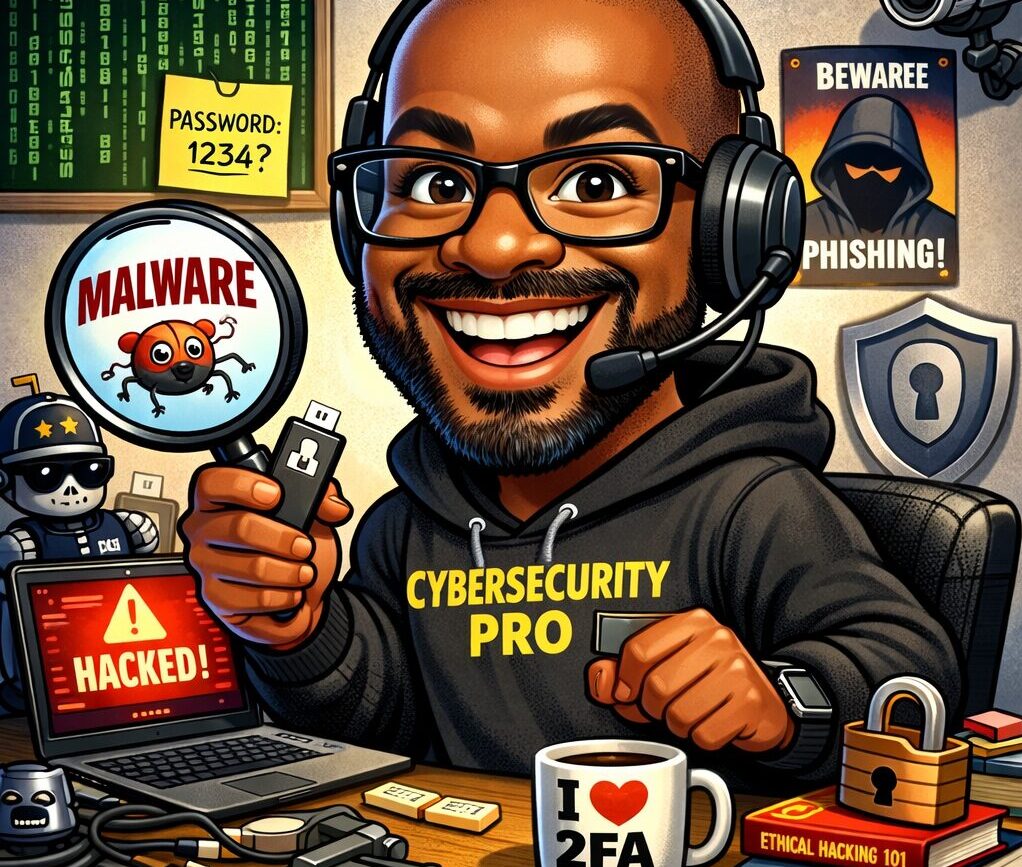
Your social feed this week probably looks like a cartoon convention with big smiling heads, exaggerated features, and a “work desk” full of perfectly chosen props. You’re not imagining things. It’s the AI caricature trend that’s everywhere right now, and the idea is simple: upload a photo, then ask ChatGPT to generate a caricature of you at work. It is fun, and the internet is doing what the internet does: we find a new button, we press it a million times, and we flood social media with the results.
BUT there’s a reason this trend gives security folks that tiny eye twitch.
This trend pops up every year. It’s basically the AI doll / action-figure trend from last year, wearing a new outfit. Last year, people were turning themselves into “action figures” with accessories based on their jobs and hobbies… and security experts were warning that combining your face with personal details can create very real risks.
This AI caricature trend is the same concept, with the same risks, just with a new spin. Here’s why scammers love these viral trends, and how you can join the fun without accidentally creating your own personal “scammer starter kit.”
Why trends like this are a scammer’s favorite snack

The caricature trend is often described like this: “Create a caricature of me and my job based on everything you know about me.”
That “everything you know about me” part? That should be an enormous flashing warning light!
Some people now have years of chats in their ChatGPT history, and the trend specifically leans into that idea—that ChatGPT can use what it knows about you from your past chats to make the caricature more “accurate.”
Now, two important truths can exist at the same time:
- Most people aren’t sharing anything wildly sensitive in their AI chats.
- A surprising number of people absolutely are.
And scammers don’t need your deepest, darkest secrets. They just need enough information and truth to sound believable. That’s what social engineering is: tricking you with information they know about you and using it to play on your emotions, not hacking you with lasers.
The “perfect scam profile” is your face + context

Here’s what this trend encourages people to combine in one neat, shareable image:
1) A clear photo of your face
That matters because your face is you. It’s how people recognize you, and it’s how systems recognize you too (think: face unlock on your phone, facial recognition tools, identity checks, account recovery photos, AI deepfakes, and impersonation attempts).
2) Your job identity
These caricatures are usually filled with job clues: uniforms, tools, badges, office settings, company swag, and sometimes even industry-specific details.
3) Personal interests
Coffee fanatic. Marathon runner. Dog mom. Disney adult. Jeep guy. Taylor Swift superfan. You know… the stuff that makes you human. And that’s exactly the point: in last year’s AI doll trend warning, the cybersecurity expert specifically called out that you’re often giving AI “a lot of information about yourself… interests… hobbies,” and that those details can be used to interact with you in a scam or social-engineering situation—especially once you post it publicly.
In other words: you’re not just posting a cute picture. You’re posting a profile.
“But what can a scammer really do with that?”

A scammer can actually do a lot with the information they gather from these AI-generated caricatures, and none of it requires Hollywood-movie level hacking.
Scenario A: The “work password reset” trap
A scammer sees you’re in healthcare, education, banking, HR, IT, or basically any role with access to systems. They send a message that looks like a work support request, a payroll update, or an urgent “account issue.” This is the same psychology we’ve talked about before: urgency + authority + a “quick fix” button. For example, fake “fix/update” pop-ups and verification prompts are designed to make you act before you think. More frequently, it’s a phone call from someone impersonating tech support, instead of a phishing email, because people trust a real human voice.
Scenario B: The “friendly stranger” who turns into a financial trap
This is classic pig-butchering scam behavior. You get a friendly “wrong number,” a casual chat about things they know you are interested in, then a slow build toward money, crypto, or a “can you help me with something quick?” moment. When scammers already know your job and interests, the “bonding” part gets easier. They can mirror your personality and sound like your kind of people.
Scenario C: The impersonation escalator
Once your face and details are out there, it becomes easier to mimic you or convincingly pretend to be someone close to you. Deepfakes are just one way your image can be used in fraud, including family impersonations and the “grandparent scam” style pressure tactics. Even without deepfakes, just having your face plus personal details makes it easier to run a believable impersonation attempt on either you or your family and friends.
Scenario D: “Security questions” you didn’t realize you answered
As we’ve talked about before, it’s pretty common for people to use hobbies, pets names, kids’ birthdays, and favorite teams in their passwords. People will often casually reveal their passwords or the answers to common “verification” prompts without realizing it. Your caricature might include your kids, your dog, a jersey, school colors, travel hints, or other clues to your interests, and it all adds up to more information for scammers.
The real risk isn’t the caricature. It’s the trail.
A lot of the risk doesn’t come from the cartoon itself. It comes from this combination of events:
- You upload a clear photo
- You share extra personal details to “make it better”
- You post it publicly
- Then strangers (and bots) can save, scrape, and reuse it forever
That’s the part people skip because it’s boring. But boring is where the damage lives. If you want a strong practical counter-move: reduce what’s out there about you in the first place. Follow our step-by-step guide for removing personal data online (starting with Google’s “Results About You,” then moving into data broker opt-outs). And if you want a broader “privacy toolbox,” there’s also a great roundup of opt-out tools (like do-not-call, credit freezes, and data broker opt-outs).
“Doesn’t ChatGPT already know me?”
The more you use it, the more it knows about you, and sometimes people accidentally teach it a lot more than they meant to. The good news: you can control how your ChatGPT data is used. OpenAI provides Data Controls where you can turn off “Improve the model for everyone” (so your chats aren’t used to train models). There are also memory-related controls (like turning off referencing chat history / saved memories) depending on how you use ChatGPT. Even if you never touch a single setting, the main takeaway is still simple:
Don’t treat AI like a diary. Treat it like a helpful stranger. If you wouldn’t tell it to a random person in a coffee shop, don’t type it into a chatbot, especially not alongside photos.
Here’s how to do the viral AI caricature trend safer

Being in cybersecurity, we’re here to make you safer, not to ruin your fun. Here’s how to keep your fun from turning into “why is someone calling my grandma pretending to be me?”
Use less-identifying images
- Avoid using the exact photo you use on LinkedIn, Facebook, or your work badge.
- Avoid super high-resolution, close-up face photos.
- Consider using a photo where your face is not perfectly front-facing.
Keep job details generic
Instead of: “Create a caricature of me and my job as a nurse at Children’s Hospital in Springfield…”
Try: “Create a caricature of me at work in a generic office setting in a cubicle.”
The more specific you get, the more you hand someone a script.
Definitely DO NOT include:
- Your employer’s name
- The city/neighborhood where you live
- Work email format
- Coworker names and images
- Client/customer details
- Anything financial or health-related
Be careful what you post publicly
If you do post it:
- Don’t tag your employer
- Don’t geotag your location
- Don’t add a caption that hands out bonus details (“Night shift ER nurse, third floor, badge color is blue!”)
Tighten your scam defenses
Because trends create waves, and scammers surf them. Here’s a quick personal checklist:
- If someone pressures you with urgency, pause.
- If a message involves money, gift cards, crypto, or “verify your identity,” assume scam until proven otherwise.
- Verify requests using a second method (call the official number, not the one in the message).
- If you’re getting more weird calls lately, revisit your phone scam defenses.
Viral trends will continue

The AI caricature trend is fun because it feels personal, like the internet is celebrating you. But the exact ingredients that make it feel personal (your face, your job, your interests, and your “details”) are also what make it valuable to scammers. Trends fade, but screenshots and personal information tend not to. So yes, make the caricature if you want. Just don’t accidentally hand out your identity, routine, clues about your employer, or your personal “trust buttons” in one cute, shareable graphic. If you want one practical next step after reading this: go clean up what’s already out there. Start with deleting your personal data online, and you’ll instantly make yourself a harder target.
| Listen to this as a Podcast |

